Intelligence · Feature
Smart Q&A
Targeted questions that close gaps before you draft — with AI-suggested answers.
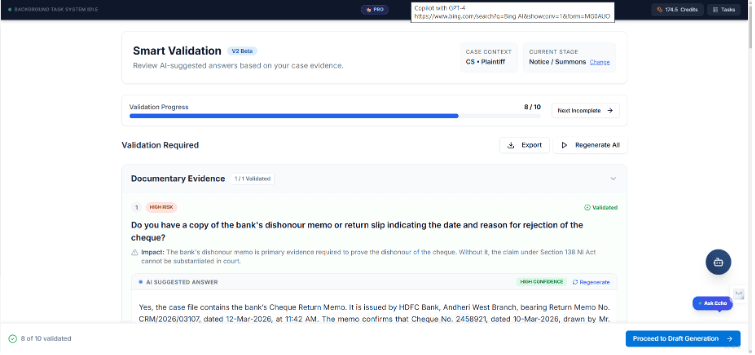
In practice
What this feature is for
Smart Q&A works out what your case still needs and asks only the questions that matter — with suggestions grounded in evidence. Missing facts surface at the worst time: during drafting or, worse, in court.
The gap
What slows you down
Missing facts surface at the worst time: during drafting or, worse, in court.
How CaseClarity helps
The solution
Smart Q&A works out what your case still needs and asks only the questions that matter — with suggestions grounded in evidence.
Benefits
What you gain on a real matter
Gap analysis for initiating and defending matters
AI-suggested answers from uploaded evidence
Defence gap register for responding parties
Answers feed directly into draft generation
Workflow
How the work actually moves
Follow these steps inside CaseClarity — each one feeds the next so you never restart from a blank page.
Run after legal analysis
Smart Q&A uses statutes and facts already on the matter.
Answer with suggestions
Accept, edit, or rewrite AI suggestions quickly.
Close critical gaps
Priority-ordered questions so nothing material is left blank.
Draft with confidence
Completed Q&A enriches the drafting context.
Why it matters
Built for Indian litigation pressure
Smart Q&A is not a bolt-on tool. It lives on the matter so seniors can review, juniors can execute, and nothing important is trapped in a private WhatsApp thread. Every output is meant to be edited by counsel before filing.
- Grounded in documents you upload — not invented case facts
- Firm-scoped access with encryption and isolation
- Fits plaintiff and defendant work where the product supports it
Best used when
- You need smart q&a without leaving the matter file.
- You want juniors to work inside a standard process seniors can trust.
- You are tired of restarting drafts from empty templates.
- You want this step to feed analysis, Q&A, or drafting automatically.
FAQ
Smart Q&A FAQ
Back to the full capability map.
Open a matter today
Put Smart Q&A to work on your next file.
Create an account and run it on a real matter — not a demo toy.